Showing posts with label Software. Show all posts

Sunday, 22 June 2008

Firefox 3 add-ons

Have you update your Mozilla firefox to Firefox3? The back and forward buttons Firefox 3 are now pushed together and the download manager can now resume halted downloads after you've restarted the browser or your network connection. But, some add-ons for blogging are not working with Firefox 3 and you need to wait the update from the developer.

Thursday, 19 June 2008

Is Mac OS X Leopard the best OS?

Do you know that most people said that Mac OS X Leopard is the best operating system (data as of 20 June 2008 - 32 %, 4019 voted)?what is your choice as the best operating system?For Zombie, windows XP is still the best OS because easy to find software or XP and have no problem with the hardware. Let's join the world to select the best operating system.

Wednesday, 18 June 2008

ThinkPad X61 Ultralight Notebook

ThinkPad X61 Ultralight, with Intel® Core™ 2 Duo T8100 (2.1GHz, 3MB L2, 800MHz FSB) and 1 GB PC2-5300 DDR2 SDRAM 667MHz SODIMM Memory (1 DIMM) ,is as fast as any larger notebook but way more fun to use and a delight to travel with. The ThinkPad X61 Ultralight only concern is that the machine comes loaded with software and way behind on updates. Updating the system and uninstalling software takes hours over several days.

Wednesday, 11 June 2008

Microsoft's Windows Live FolderShare to backup your file

Access your file at home from office with Microsoft's Windows Live FolderShare, which syncs files across the Internet (and does so automatically). Microsoft's Windows Live FolderShare advantage is that you can expand your backup network to include friends, syncing critical files to their machines and vice-versa. Microsoft's Windows Live FolderShare costs nothing to use. Microsoft's Windows Live FolderShare can sync files up to 2 GBs in size. And it works on both Mac and PC.
For offline way to back up your file use SyncToy 1.4


Sunday, 8 June 2008

Client Energy Calculator

If you are using HP Desktop in your office, home or school then you should try this great calculator. You can visit www.energycalc.verdiem.com to calculate energy saving potential from your HP Desktop. All you have to do is just select are you Corporation, school or Government. Type the average cost per kWh and number of units desktop that you have.


Friday, 9 May 2008

Free Microsoft Windows Movie Maker

Free Windows Movie Maker, Use your PC to create, edit and share home movies with free software form Microsoft

Microsoft, a scrappy little software company in the state of Washington, has a different version of their software Movie Maker. With Movie Maker 2, you can create, edit and share your movies at home. You can share movies with drag-and-drop command, you can send your pictures for you emphasize that the best scenes. Then you can share your movie via the Web, e-mail or CD, you can also get your film on the video tape in the unit for playback on a TV or on the device itself.

The next things are requirements for video capture, a way to secure your videos on your computer. This requires the input of the hardware depending on the source of the video.
If you have a digital video camera (DV) camera, you need both an IEEE 1394 and a card for analog video capture card. IEEE 1394 is recommended for the best results. Many new computers with an IEEE 1394 card already installed. If not, there are a number of suppliers, a map, which together with your computer.
If you have an analog video camera or a VCR, you need an analog video capture card.

Download Free Microsoft Windows Movie Maker

Wednesday, 7 May 2008

Recovering data from a damaged Windows Vista

It looked as Microsoft has finally been doing the right things. The betas of Vista SP1 came with a modern equivalent of the old Windows, the floppy boot - an option on the start menu called "create a CD-ROM rescue burned as Windows PE based on CD-ROM emergency . Unfortunately, Microsoft has removed this function, Service Pack 1 before shipment, but not before NeoSmart turned the disk in a file. ISO file and it did on its website.

Running a version of Windows Vista PE, the CD-ROM rescue is actually a Vista installation CD-ROM without installation files. It even has a "Install Now" button appears on the appeal is not a product key. You are better by clicking on the repair of computers affected. Among the options Vista are an instrument of diagnosis and fixing problems start, a system recovery, recovery points on the hard drive, restoration of parts of Vista's backup program and a diagnostic tool memory.

Tuesday, 6 May 2008

Windows XP SP3

Windows XP SP3 is now available through Windows Update and also on the Microsoft Download Center. Microsoft had expected to release the code on April 29; however, it unconcealed it conflicted with a covering called Microsoft Dynamics RMS. The problem also affected Windows Vista SP1. Dynamics RMS is a retail-chain-management code for small and midsized businesses.

Microsoft recommends that Dynamics RMS users of Windows XP Service Pack 3 or Windows Vista Service Pack 1 search more information on Microsoft's technical support services.

Saturday, 3 May 2008

Thunderbird patched five bugs

Mozilla Messaging last week patched five bugs in its Thunderbird e-mail client to mend flaws that were unconcealed more than a month ago. Thunderbird 2.0.0.14 patches vulnerabilities in the Firefox engine, which the open-source e-mailer uses to intercommunicate HTML. The same holes were closed in New March for the Mozilla Web browser.

The bugs, which could be exploited by rogue JavaScript, had gone unfixed in Thunderbird because of resource shortages at the Mozilla spinoff, according to comments made at the time by its CEO, David Ascher. Click here to download the latest Thunderbird

Wednesday, 30 April 2008

Synaptic Package Manager

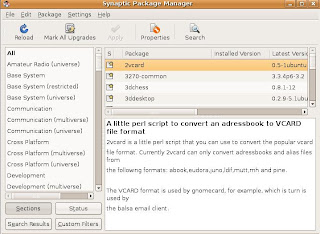
Synaptic Package Manager is a utility that came with Ubuntu Distro that you can use fro browsing through large online software libraries (called repositories) to locate and install applications and utilities as required. Select one and mark it for installation, and it will automatically install when you click Apply. It will even automatically grab any other files that its installation depends on, without requiring you to do any extra work.

Burn ISO File

There is a lot off Linux distro that you can find from the internet. Do you know that most of that Linux distro have capabilities to burn ISO Image file. Not only Linux, Mac OS can ISO burn Image file without to CD without a little third-party help. If you are Windows XP user and having problem to burn ISO image file into disc, you can find a lot off free software that you can download and install to burn your ISO image file.

Burn4Free CD and DVD are free software and burning solution that's compatible with more than 3,000 DVD and CD burners. Burn data and audio from different file types (WAV, WMA, MP3, OGG, FLAC, WavPack, and CDA). Burn and save ISO files, open and save your project to disk, verify content, print compilations, copy DVDs, and import your audio compilation from M3U and ASX playlists. The drives supported include dual-layer DVD, CD-R, CD-RW, DVD-R, DVD+R, DVD-RW, DVD+RW, and DVD-RAM (SCSI, IDE, EIDE, and USB 1.0 and 2.0). Version 4.3 adds Vista compatibility, updated audio engine.